
"What is SEO? A Beginner’s Guide to Using SEO in Your WordPress Workflow"
"What is SEO? A Beginner’s Guide to Using SEO in Your WordPress Workflow"
SEO Demystified 🚀: The Ultimate Beginner’s Guide to Mastering SEO in Your WordPress Workflow (and Getting 100,000+ Visitors with ArcanoLabs!)
Imagine this: you launch your WordPress site, pour hours into blogs or your freelance portfolio, and wait for the visitors to roll in. Days go by… crickets. 😬 Wondering why? The answer is simple: SEO (Search Engine Optimization) – the secret sauce behind ranking high on Google, getting found online, and growing your business.
If you know SEO matters but have no idea where to start, you’re in exactly the right place! This beginner’s guide breaks down what SEO is, why it’s crucial for WordPress users and freelancers, and how to use SEO like a pro—with actionable tips, step-by-step guidance, and some friendly advice from the experts at ArcanoLabs.
Ready to unlock serious traffic, skyrocket your Google rankings, and finally see results from your website? Let’s jump in! 🌟
What Is SEO? (In Words You’ll Actually Understand)

SEO—or search engine optimization—is how you help your website appear at the top of Google for what your visitors are actually searching for. SEO isn’t about tricking anyone… it’s about creating great content and ensuring search engines like Google can find, understand, and recommend your site.
Think of it as the digital equivalent of putting up the brightest sign on a busy street. Google wants to send searchers to the best, most relevant, and trustworthy pages. If you set up your WordPress site the right way, you get free, “organic” visitors month after month!
- SEO helps your site appear when people type keywords into Google
- It drives free, targeted traffic (the best kind!)
- It lets you compete with big brands on a level playing field
- And it’s essential for freelancers, bloggers, businesses, and anyone who needs to be found online
Still feeling lost? No worries! Let’s break down how SEO works—and exactly how you can use it to boost your WordPress traffic.
 Why Should Beginners Care About SEO for WordPress?
“Do I really need SEO for my WordPress site?” Is it worth your time if you’re just starting out, a freelancer, or running a small business? YES! Here’s why:
- 🌍 93% of online experiences begin with a search engine
- 📝 Google sends more traffic to websites than any other source—even social media
- 💸 Organic traffic converts better than ads… and it’s free!
- ✅ If you ignore SEO, your content may never be seen by your ideal customers
For freelancers and solo entrepreneurs, a strong SEO foundation means you can:
- Land more clients (they find you, instead of you chasing them)
- Build authority and show up when people search your skills
- Turn your site into a lead generation machine (even while you sleep 😴)
That’s why top WordPress experts – including the pros at ArcanoLabs – always prioritize SEO for maximum visibility and traffic growth.
How Do Search Engines Actually Work? (The 3-Step SEO Cycle)
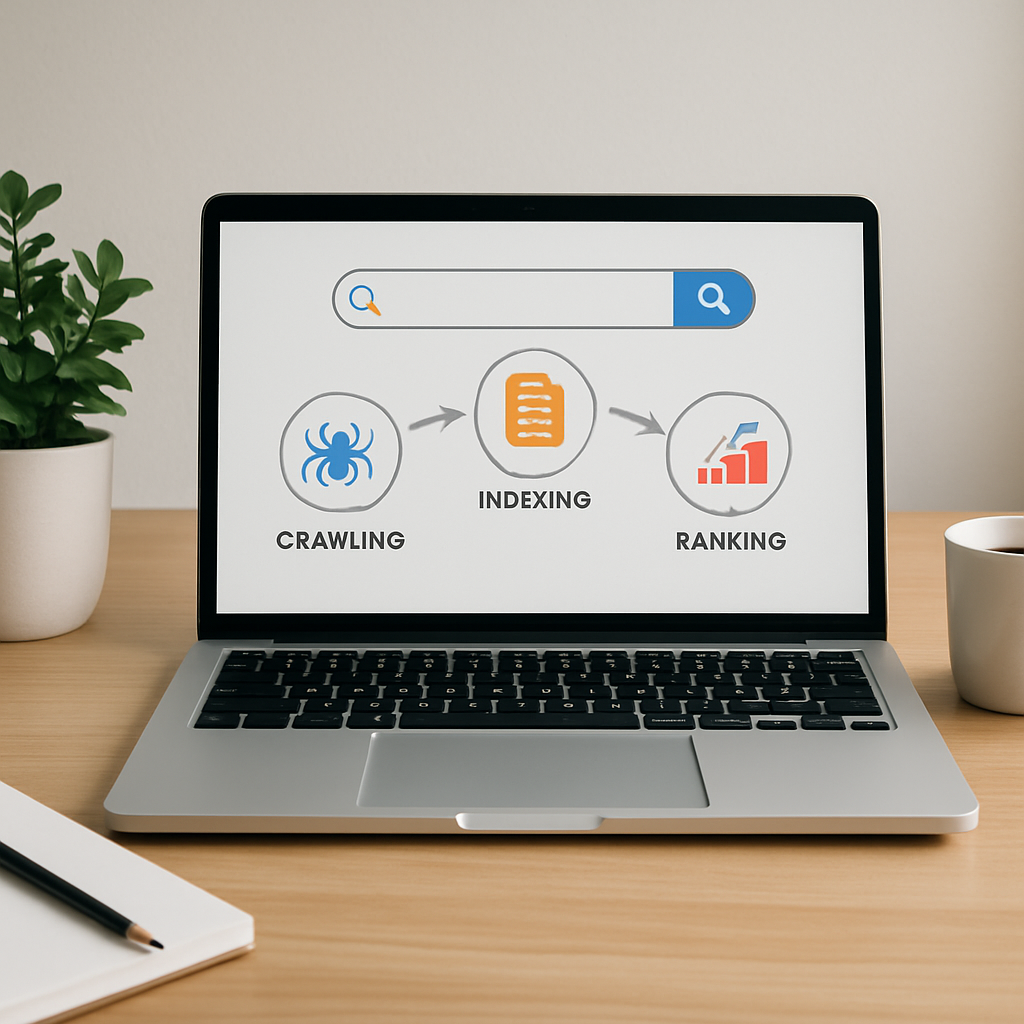
To master SEO for WordPress, you have to understand how Google “reads” and ranks web pages. Here are the basics in plain English:
- Crawling: Search engines use robots (bots) to “crawl” your site, reading pages and following links.
- Indexing: Once found, Google adds your pages to its massive index (database).
- Ranking: When someone searches, Google’s algorithm decides which indexed pages deserve to show up first.
Good SEO = More Crawling + Better Indexing + Higher Rankings
That’s it! Your job is to make your WordPress site as search-friendly and valuable as possible. Next, we’ll show you exactly how.
The 5 Pillars of WordPress SEO (And Why They Matter)

Let’s make this super actionable! Effective SEO boils down to five core areas. If you pay attention to these and use the best tools (like ArcanoLabs), you’ll build a site Google loves to rank:
- 🔑 Keyword Research – Discover what your audience is searching (and how to target those keywords)
- ✍️ On-Page SEO – Optimize every page for Google and your readers
- 🔗 Technical SEO – Ensure your website is fast, mobile-friendly, and easily crawled
- 📈 Content Strategy – Create valuable, original content that solves real problems
- 🤝 Link Building – Get other trustworthy sites to link to yours (shows Google you’re credible!)
Let’s dig into each pillar, step by step, and show you how ArcanoLabs Marketing can supercharge your progress at every stage.
1. Smart Keyword Research: The Foundation of All SEO
Keyword research answers the #1 question in SEO: What words and phrases are your potential visitors typing into Google? If you match your content to the right “keywords,” you’ll get laser-targeted traffic.
Here’s the beginner-friendly game plan to find your winning keywords:
- Put yourself in your ideal visitor’s shoes. What would THEY type into Google to find your site, your products, or your blog?
- Use keyword tools. Try free tools like KeywordTool.io, SEMrush, or Google’s own Keyword Planner.
- Focus on long-tail keywords. These are longer, specific search phrases like “best vegan café in Brooklyn” instead of just “café.” They’re easier to rank for and attract visitors who are ready to take action.
Pro tip: For WordPress users and freelancers, “how-to” keywords and service-based phrases convert amazingly well.
ArcanoLabs Bonus 🚀: ArcanoLabs comes with integrated keyword detection and clustering tools, so you always know which keywords to target for maximum traffic.

2. On-Page SEO: Optimizing Your Content for Google (Step by Step)
On-page SEO means making every blog post and page on your WordPress site Google-friendly. It’s all about clear structure, targeted keywords, and awesome readability. Here’s how to ace it, even as a beginner:
-
Use your main keyword in:
- The page title and meta description
- The URL (slug)
- At least one heading (H1 or H2)
- In the first 100 words of your copy
- Structure with headings (H2, H3): Break up your content (just like this article!) so it’s easy to scan and read.
- Add images with alt text: Google can’t “see” images—tell it what the image shows with clear alt text (see above image formatting!)
- Link to related articles or helpful external sources: This shows Google—and your readers—that your content is well-researched.
Don’t overuse keywords! Make your writing natural, helpful, and engaging. Google loves content that real humans enjoy reading. 😊
ArcanoLabs SEO Magic ✨: Use ArcanoLabs’s built-in SEO checklists and real-time keyword density tips, ensuring every piece of content is fully optimized before you hit publish!
3. Technical SEO: Make Sure Your Site Is Crawlable and FAST
You wouldn’t open a store with locked doors, right? Technical SEO ensures Google can easily “crawl” and index your WordPress site, and that visitors get a snappy, mobile-friendly experience.
- ✅ Mobile-friendly theme: Over half of web traffic is mobile. Use a responsive WordPress theme.
- ✅ Speed optimization: Compress images (use WP Smush), implement caching (try W3 Total Cache), and use a reliable hosting provider.
- ✅ XML sitemap: Install an SEO plugin (like ArcanoLabs or Yoast) to generate a sitemap and submit it to Google Search Console.
- ✅ Clean URLs: Set permalinks to “post name” under WordPress Settings > Permalinks.
- ✅ Secure site (HTTPS): Activate SSL to boost trust and ranking.
ArcanoLabs Advantage 🛠️: ArcanoLabs automatically audits your WordPress site for technical SEO issues and gives you step-by-step fixes—making it easy, even if you’re a total beginner.
4. Content Strategy: Why Great Content Is Still King
You’ve heard it before: content is king. But it’s not just about writing lots of blog posts—it’s about creating the right content your ideal visitors are looking for.
Here’s what a winning SEO content strategy looks like:
- 🔹 Answer real questions: Use tools like Answer the Public to find what your audience is searching for
- 🔹 Write in-depth, helpful posts: Google rewards long, thorough content (like this very guide!)
- 🔹 Mix evergreen and trending topics: Cover topics that will always be useful (evergreen), as well as current trends or news in your field
- 🔹 Update existing content: Refresh old posts to keep them ranking high
ArcanoLabs Smart Planner 📅: ArcanoLabs’s AI-driven content planner suggests topics with high traffic potential and helps you schedule content for consistent growth.
5. Link Building: Earn Trust (and Authority) With Quality Links
Links from other websites are like upvotes in Google’s eyes. The more quality sites link to you, the more credible and authoritative your WordPress site appears.
Easy beginner strategies:
- 🤝 Guest posting: Write for reputable sites in your niche and link back to your own site
- 🔗 Share your content on relevant forums, subreddits, and communities
- 📣 Connect with other WordPress users and freelancers; ask to swap links where natural
- 🔁 Update your content with internal links: Link between your own related posts (great for both readers AND SEO!)
ArcanoLabs Outreach Engine: ArcanoLabs offers automated outreach templates and discoverability tools to help you build momentum with real, high-authority backlinks.
Step-by-Step: Optimizing a WordPress Post for SEO (Checklist Included!)
Let’s pull it together. Here’s your quick-start SEO checklist for every WordPress post:
- Pick a researched, relevant keyword (using ArcanoLabs or the tools above)
- Write a compelling, keyword-rich title and meta description
- Use your main keyword in the URL, the first paragraph, and at least one heading
- Break content into short, scannable paragraphs (use headings!)
- Include optimized images with descriptive “alt text”
- Link to your own related posts and high-quality external sources
- Install and configure an SEO plugin (like ArcanoLabs Marketing for WordPress)
- Preview and fix mobile or speed problems before hitting publish
- Share your post on social media and with communities
Pro tip: ArcanoLabs provides an instant SEO score and step-by-step improvement guide on every post!
Common SEO Mistakes Beginners Should Avoid 🚨
Don’t fall into these classic WordPress SEO traps!
- Keyword stuffing: Overusing keywords can tank your rankings. Always write for humans first.
- Ignoring site speed: Slow sites lose both visitors and Google rankings. Optimize images, use caching, and upgrade hosting as needed.
- Forgetting internal links: Link between your own content to keep visitors engaged and help Google crawl your site.
- Skipping meta titles/descriptions: Each page needs its own unique, keyword-optimized title and description.
- Neglecting mobile users: Always test your site on mobile devices and choose a mobile-friendly theme.
Must-Have SEO Tools for WordPress Beginners
Your SEO toolkit doesn’t need to be overwhelming. Start with these essentials:
- ArcanoLabs Marketing for WordPress: All-in-one SEO toolkit with automated audits, keyword analysis, competitor tracking, and AI-powered content planning. Perfect for freelancers and beginners!
- Yoast SEO: Another popular plugin for basic SEO features
- Google Search Console: Free tool to monitor your rankings and spot site issues
- Google Analytics: Track traffic and see which content is working
- Ahrefs or SEMrush: Advanced tools for keyword research and backlink tracking
ArcanoLabs integrates all your SEO data with actionable insights in one easy-to-use dashboard, saving you time and driving real results!
SEO for Freelancers: Why Your Portfolio and Client Pages Need Optimization
If you’re a freelancer, optimizing your WordPress portfolio or client landing pages with SEO is the greatest way to get discovered organically:
- ✅ Attracts inbound leads who are already interested in your services
- ✅ Builds authority and trust (Google’s top recommendations get more credibility)
- ✅ Sets you apart from freelancers who only rely on social media or gig platforms
- ✅ Gives you a platform to showcase client results and success stories (which rank in search!)
ArcanoLabs Pro Value for Freelancers: ArcanoLabs tailors keyword research, automates SEO reporting, and shows you exactly how to compete for profitable freelance search terms (“website designer in Miami,” “SEO consultant for WordPress,” etc.).
Can I Really Get 100,000+ Visitors with SEO?
Short answer: YES… if you follow a smart, consistent SEO workflow and use the right tools!
- ArcanoLabs clients regularly scale their WordPress traffic from zero to 100,000+ monthly visitors
- It takes the guesswork out of SEO for beginners, automating what pros do manually
- You see exactly which keywords, topics, and backlinks drive the most growth—so you can double down
Remember: Massive traffic comes from building authority over time, creating content people love, and fixing small SEO issues as they arise.
FAQ: Quick Answers to Beginner SEO Questions
- Is SEO really free? Yes! Organic SEO doesn’t cost extra, but you’ll get better results if you invest in tools like ArcanoLabs to streamline your workflow.
- How long does SEO take to work? Expect to see significant results within 3-6 months—but some improvement can happen in just a few weeks!
- Can I do SEO myself? Absolutely, especially with beginner-friendly platforms like ArcanoLabs that guide you every step of the way.
- Can freelancers benefit from SEO? 100%—in fact, it’s your best chance to get recurring, high-quality leads without paying referral fees.
- Do I need to code for technical SEO? Not with the right plugins—ArcanoLabs and quality WordPress themes handle 95% of technical setup!
ArcanoLabs: The SEO Secret Weapon for WordPress Beginners and Freelancers
Throughout this guide, we’ve seen how ArcanoLabs empowers you to take control of SEO without the frustration. Here’s why thousands of WordPress beginners—and a fast-growing number of freelancers—choose ArcanoLabs:
- 🚀 Get up and running in minutes – no coding, no jargon
- 📊 Live SEO audits and checklists on every post
- 🔍 AI-driven keyword and topic research for instant content ideas
- 🧠 Competitor tracking—see what’s working for others and outsmart them
- 🤖 Automated reporting and improvement tips
- 🤩 Freelancer-friendly dashboards—track portfolios, landing pages, and niche traffic in one click
Want a shortcut to 100,000 monthly visitors, more clients, and unstoppable Google rankings? Try ArcanoLabs Marketing for WordPress today!
Conclusion: Take Your First SEO Steps (and Watch Traffic, Clients, and Results Soar!)
In today’s digital world, SEO isn’t optional—it’s fundamental to WordPress growth. Whether you’re a freelancer, side hustler, or just getting started, putting SEO at the heart of your workflow unlocks free, targeted traffic and puts your business on the map. 🌎
Start small: Pick a target keyword. Optimize your next blog post. Use smart SEO tools (like ArcanoLabs) to catch easy wins and squish technical problems before they cost you visitors.
Remember: You don’t need to be an expert. You just need the right action plan—and a little help from friendly guides and smart platforms.
Your next steps:
- ✅ Re-read this guide and bookmark it for future reference
- ✅ Install an all-in-one SEO plugin like ArcanoLabs on your WordPress site
- ✅ Take the first step: optimize your homepage or portfolio for a single keyword
- ✅ Watch your traffic, rankings, and client leads soar
Ready to get started? Sign up for ArcanoLabs Marketing today and finally get the WordPress traffic your hard work deserves… the smart way!
If you’ve got questions or want to share your SEO journey, drop a comment below—let’s win on Google together! 🚀
SEO shouldn't be overwhelming. With the right strategy and ArcanoLabs on your team, you're unstoppable. Here's to your next 100,000 visitors! 🙌
Advanced SEO Workflow Checklist for WordPress Freelancers
Elevate your SEO game with this actionable checklist, tailored for freelancers who want consistent results and rapid growth:
- Define clear goals: Set measurable objectives (e.g., ranked keywords, traffic increase, lead conversions) before launching campaigns.
- Benchmark your current site: Run a baseline SEO audit using ArcanoLabs or your preferred tool—identify quick wins.
- Segment target keywords: Group keywords by intent (informational, service, transactional) and map them to specific content types.
- Automate routine audits: Schedule regular on-page and technical audits to catch issues before they impact rankings.
- Refine internal linking monthly: Use plugins like Link Whisper and ArcanoLabs AI suggestions for continual link optimization.
- Update and republish top-performing posts: Leverage analytics to spot older articles that deserve a refresh for better CTR and positions.
- Track key results: Monitor organic traffic, ranking changes, and conversion rates directly from your WordPress dashboard with integrated tools.
Pro tip: Save this checklist in Google Docs and review before every new client launch or content batch to ensure nothing slips through the cracks.
Follow Author
Get notified when new posts are published